Two years ago, dictation on the Mac meant fighting with the built-in system feature and fixing half of what it heard. In 2026, AI dictation is genuinely mainstream — people draft emails, Slack messages, and entire documents by talking, and the text comes out clean. Wispr Flow deserves a lot of credit for that shift. It made voice-to-text feel effortless enough that non-nerds actually adopted it.
But Wispr Flow is a subscription, and its processing happens in the cloud. For plenty of Mac users — privacy-conscious ones, subscription-fatigued ones, or people who just want to own their tools — that's reason enough to look around. The good news: the alternatives have matured fast, and several now run entirely on your Mac. Here's an honest look at the best of them.
Wispr Flow: the one that made dictation click
Let's give the anchor its due. Wispr Flow's pitch is that you talk naturally — rambling, backtracking, changing your mind mid-sentence — and it produces text that reads like you typed it carefully. It works system-wide in any app, strips filler words, and handles punctuation and formatting without being told. The polish is real, and for many people it's the app that finally made dictation stick as a daily habit.
The trade-offs are equally real. Your audio is processed in the cloud, which is a non-starter if you dictate anything sensitive — client work, medical notes, legal drafts. And it's subscription-only, so the cost never stops. If neither of those bothers you, Wispr Flow remains an excellent default. If either one does, keep reading.
superwhisper: power modes and local processing
superwhisper is the closest thing to a direct Wispr Flow replacement, and in some ways it goes further. Its standout feature is modes: configurable presets that change how your speech gets processed depending on context. An email mode that formats greetings and sign-offs, a notes mode that produces terse bullets, custom modes with your own prompts. Combined with app-aware formatting — it knows whether you're dictating into Mail or a code editor — it's the most flexible dictation setup on the Mac.
Crucially, superwhisper can run its AI models locally, so your voice never has to leave your machine. Pricing is freemium: the paid tier is $8.49 a month or $84.99 a year, but the $249.99 lifetime license is the option that matters. It's a chunk of money upfront, but it's the escape hatch from the subscription treadmill — pay once and you're done. For heavy dictators who want control over how their words come out, this is the power-user pick.
VoiceInk: open source, on-device, $29
VoiceInk is the privacy purist's answer. It's open source under GPLv3, runs local Whisper models entirely on-device, and costs a flat $29 — one time. There's no cloud component to audit and no vendor to trust, because you can read the code yourself. If you're comfortable with a build toolchain, you can even compile it from source for free; the $29 buys you the prebuilt app and supports the developer, which feels like a fair deal.
It doesn't have superwhisper's elaborate mode system or Wispr Flow's cloud-powered polish, and it doesn't pretend to. What it offers is trustworthy, capable dictation with the shortest list of caveats on this page. For anyone who dictates confidential material — or who simply believes voice data should never leave the laptop — VoiceInk is the easy recommendation.
MacWhisper: the transcription workhorse
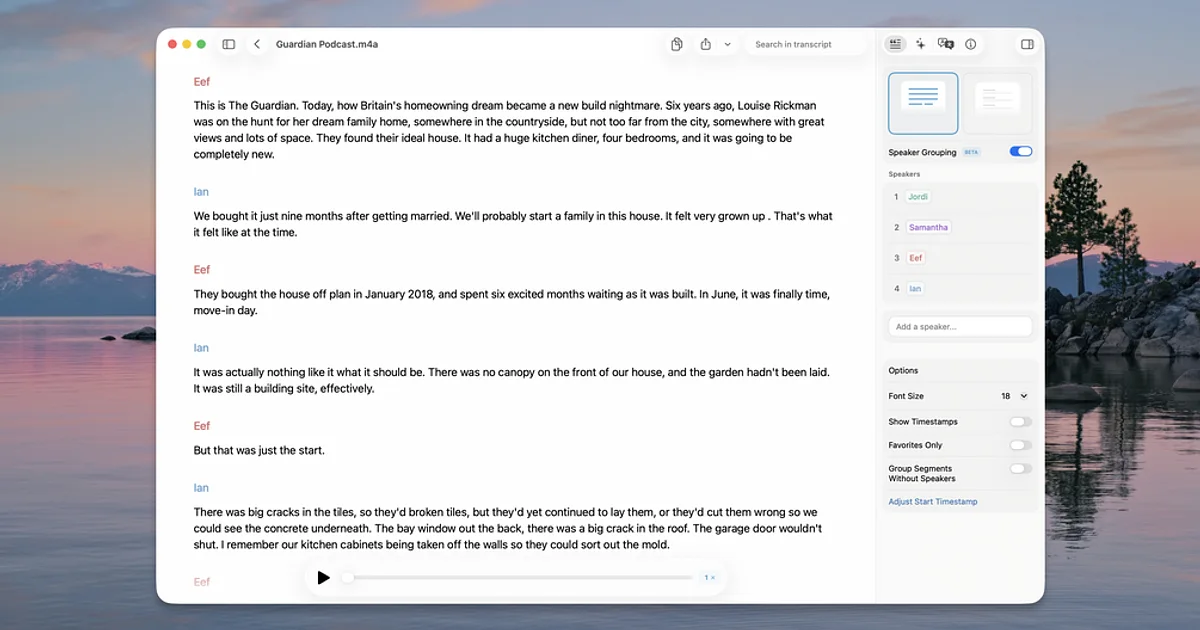
MacWhisper, from indie developer Jordi Bruin of Good Snooze, approaches the problem from a different angle. Yes, it does dictation, but its real strength is transcription: drop in a meeting recording, a voice memo, a podcast episode, or an hour-long interview, and it turns the whole thing into text using local Whisper models. It's the app you want when the audio already exists and you need words out of it.
The free version is genuinely useful, and MacWhisper Pro is a €59 one-time purchase — no subscription. If your actual need is "get transcripts of my meetings and recordings" rather than "compose text by voice all day," MacWhisper is the better tool than any pure dictation app, and it's earned its reputation as the Mac transcription workhorse.
TypeWhisper: another local option worth a look
Worth a brief mention: TypeWhisper is another local, Whisper-based dictation app for the Mac. It's a simpler take than the apps above, but if you're comparing on-device options before committing, it belongs on the shortlist.
Which one should you pick?
The honest answer depends on what you're optimizing for:
- Privacy first: VoiceInk. Open source, fully on-device, $29 once. Nothing else on this list is as verifiable.
- Power and flexibility: superwhisper. Modes and app-aware formatting make it the deepest dictation tool here, and the lifetime license kills the subscription problem.
- Transcribing recordings: MacWhisper. For meetings, interviews, and audio files, it's the specialist — and €59 once is a bargain for what it does.
- Maximum polish, subscription tolerated: Wispr Flow. It's still the smoothest end-to-end experience if cloud processing doesn't bother you.
The bottom line
Wispr Flow proved that talking to your Mac could be better than typing, and it's still a great app. But "great" no longer requires the cloud or a monthly bill. Between superwhisper's lifetime license, VoiceInk's open-source on-device approach, and MacWhisper's one-time transcription powerhouse, you can now get first-rate voice-to-text on the Mac on your own terms — private, paid for once, and yours. That's a healthier market than we had two years ago, whichever app you land on.